We have to follow some steps:
1.Create a table with two fields,
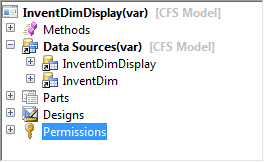
2. Create a new Form. My form has two data sources,
InventDimDisplay and
InventDim (required) and a grid.
3.Set the
InventDim data source properties to:-
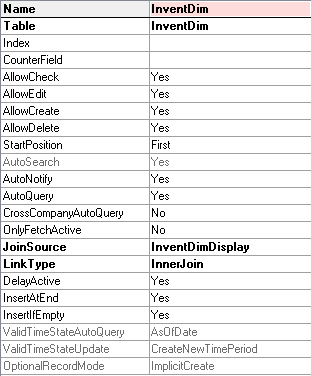
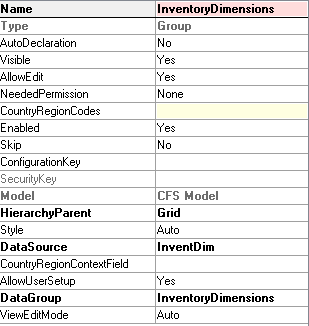
4.On form Design, create a new
Grid and move the
ItemId to your grid and then create a new
Group and then set the
properties below:
On
class declaration add the following piece of code:
public class FormRun extends ObjectRun
{
               // Declare the class InventDimCtrl_Frm_EditDimensions
    InventDimCtrl_Frm_EditDimensions        inventDimFormSetup;
}
5. Now, create a
new method in form.
public InventDimCtrl_Frm_EditDimensions inventDimSetupObject()
{
    return inventDimFormSetup;
}
6. Override the form’s method
Init.
public void init()
{
    super();
            // This method will be used to show default fields at form startup
    element.updateDesign(InventDimFormDesignUpdate::Init);
}
7. Create a
new method, this method is responsible to show the Inventory Controls.
void updateDesign(InventDimFormDesignUpdate mode)
{
    InventDimParm inventDimParmVisible;

    switch (mode)
    {
        // Form Init
        case InventDimFormDesignUpdate::Init    :
            if (!inventDimFormSetup)
            inventDimFormSetup  = InventDimCtrl_Frm_EditDimensions::newFromForm(element);
            inventDimFormSetup.parmSkipOnHandLookUp( true);

            // Use the methods on InventDimParm
           // to set which dimensions to show when form is initialized
           inventdimparmvisible.inventsiteidflag       = true;
           inventdimparmvisible.InventLocationIdFlag   = true;
           inventDimFormSetup.parmDimParmVisibleGrid(inventDimParmVisible);

        // Datasource Active
        case InventDimFormDesignUpdate::Active  :
           inventDimFormSetup.formActiveSetup(InventDimGroupSetup::newItemId(InventDimDisplay.ItemId)); //InventDimDisplay is the datasource name.
           inventDimFormSetup.formSetControls( true);
           break;

        // Datasource Field change
        case InventDimFormDesignUpdate::FieldChange :
           inventDimFormSetup.formActiveSetup(InventDimGroupSetup::newItemId(InventDimDisplay.ItemId)); //InventDimDisplay is the datasource name.
           InventDim.clearNotSelectedDim(inventDimFormSetup.parmDimParmEnabled()); // InventDim is referring to datasource name
           inventDimFormSetup.formSetControls( true);
           break;

        default :
           throw error(strFmt ("@SYS54195", funcName()));
    }
}
8. We have to
create a method on
data source to update our table InventDimId and use the method Active to refresh the controls.
Override Data source’s method Active.
public int active()
{
    int ret;
    ret = super();
    element.updateDesign(InventDimFormDesignUpdate::Active);
    return ret;
}
9. Now, override the method
Modified() for
ItemId field in your data source.
public void modified()
{
    super();

    element.updateDesign(InventDimFormDesignUpdate::FieldChange);
    InventDim.clearNotSelectedDim(element.inventDimSetupObject().parmDimParmEnabled());
}
We have to create a MenuItemButton to call the Display Dimension form where the user can select which dimensions he want to display.
Set the following properties:
MenuItemType: Display
MenuItemName: InventDimParmFixed
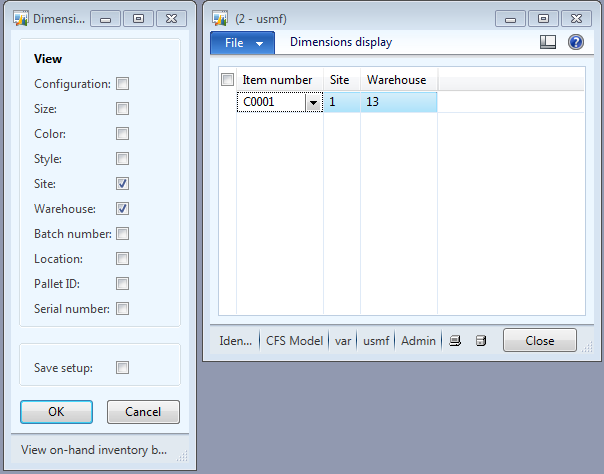
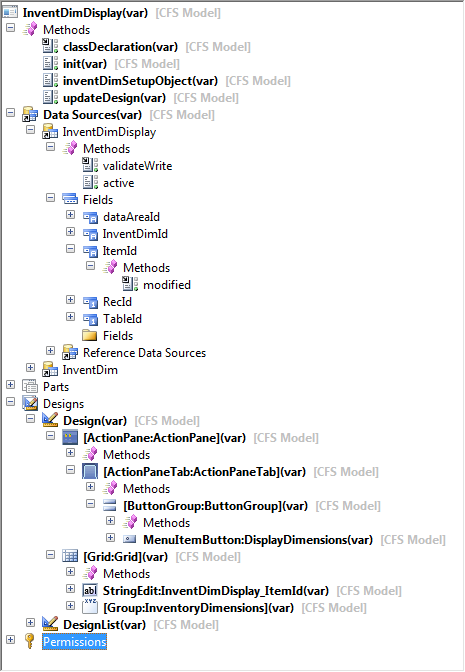
10. By the end of this tutorial, your form should look like this.
11. The results: